
Hey there,
Welcome to our Pondhouse Data newsletter about all Data & AI.
For our long-time readers, this time we restructured the format a bit: We brought the tutorials and tips section to the top and moved news to the bottom. Why? We guess you have plenty of other sources where to get AI and Data news - therefore we can’t add that much value here. However, we see that we have some of the best tutorials on the entire web - and therefore want our focus to be on that: Providing great hands-on tips for how to make the most out of Data & AI.
Let’s get started!
Cheers, Andreas & Sascha
In todays edition:
- Tutorial: Beyond Basic Prompting: How to connect LLMs with everyday tools
- Tool: Skyvern - AI can now see and control your browser - think about all the repetitive tasks to outsource
- News: Anthropic Releases Claude 3.5 Sonnet: The best LLM so far
- Tip of the week: Learn how to create stable, repeatable summaries using LLMs.
- Also in the news: DeepSeek’s Janus model outperforms in multimodal tasks, and DuckDB adds LLM integration via
prompt().
Tutorial of the week
Beyond Basic Prompting: How to connect LLMs with everyday tools

Imagine having a brilliant consultant who knows everything from books but can't touch or interact with anything in the real world. That's essentially what a basic LLM is. Now, imagine giving this consultant hands to type, tools to calculate, and the ability to look up current information. That's what happens when we augment LLMs with tools. By providing access to calculators, code interpreters, databases, and APIs, we're essentially giving these AI models the ability to not just think, but to do. This strategy finally transforms LLMs from being just chatbots into capable digital assistants that can perform real-world tasks.
What are LLM tools?
At their core, tools for LLMs are simply functions with clear descriptions that the AI can understand and invoke. When you provide an LLM with a tool, you're essentially giving it a capability to interact with the outside world through well-defined interfaces. These tools can be as simple as a calculator function or as complex as a full database query system. The magic happens in the interaction: the LLM receives your prompt along with descriptions of available tools, decides whether it needs to use any tools to fulfill your request, and if necessary, calls the appropriate function with the correct parameters. When we say they “call” the function: LLMs simply tell you to call the function and provides the parameter values for you - so you’re always in charge of the whole process. But by cleverly automating the interaction, we can give the LLM as much control as we want.
Step by step: How to create tools for LLMs
The whole process is - in general - rather simple:
- Create a code runtime environment, where you can run code. A python environment for example.
- Create a function that for example interacts with an API or a database. The function can also have parameters, they will be provided by the LLM later on.
- Describe, in natural language, what this function does. Also describe the parameters and the return value.
- In your application, when you want an LLM to execute a specific task, send your task prompt the LLM, as well as all the tool (think, function) descriptions. The LLM will then decide whether it can fulfill your prompt without using a tool - or if it needs a tool.
- If the LLM decides to use a tool, it will tell you which tool to use. You then simply call your function with the parameters provided by the LLM. In pseudo python code, this is just an if statement:
To summarize: A tool is nothing more then a function with a good description so that the LLM knows what it does and how to use it.
Example: Create a tool to connect your Azure Blob Storage to AI
For a full example on how to create a tool to connect AI to Azure Blob Storage, see our detailed guide below.
Using Azure Blob Storage as tool example is quite good for learning purposes, as the Blob Storage API is quite complex and it acts as a general guideline for how to connect almost any Azure resource to your LLM.
How to create LLM tools from any Python SDK using langchain-autotoolsLLMs can use Tools to interact with other technology, like databases or APIs. Creating such tools however requires to semantically match the semantics of the LLM with the tool. Learn here how langchain-autotools makes this very easy.www.pondhouse-data.com/blog/langchain-auto-tools →
Tool of the week
Skyvern enables AI to execute repetitive tasks in our browsers
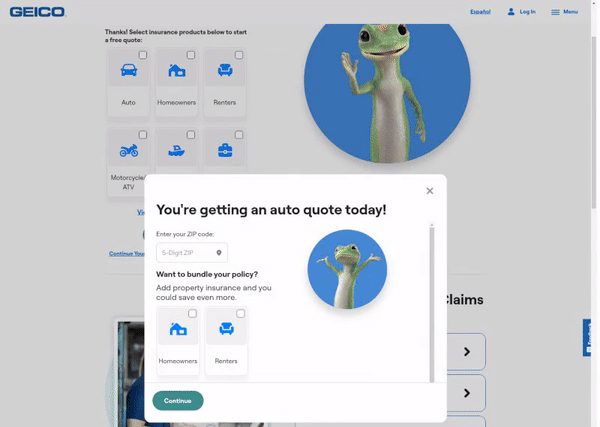
Web browsers are at the center of modern business operations, but they're also the source of countless repetitive tasks that drain productivity. Browser automation tools have been around for years, but they all share the same fundamental limitation: they can't actually see what's on your screen - and therefore heavily rely on extensive, hard-to-maintain scripts.
By using modern vision AI, Skyvern takes a different approach. It streams your screen to an AI that can understand visual context and gets instructions from said AI to click buttons, open dropdowns, etc. No more brittle selectors or broken scripts – Skyvern sees buttons, forms, and interfaces just like you do, making it capable of handling complex web interactions.
As streaming your entire browser screen provides some privacy concerns, Skyvern can be fully hosted on your own infrastructure and uses the AI provider of your choice. Eg. Azure OpenAI or AWS bedrock. Self-hosted LLMs like Llama 3.2 are currently in development.
GitHub - Skyvern-AI/skyvern: Automate browser-based workflows with LLMs and Computer VisionAutomate browser-based workflows with LLMs and Computer Vision - Skyvern-AI/skyverngithub.com/Skyvern-AI/skyvern/tree/main →Top News
Anthropic Claude 3.5 Sonnet (new) is by far the best LLM for now
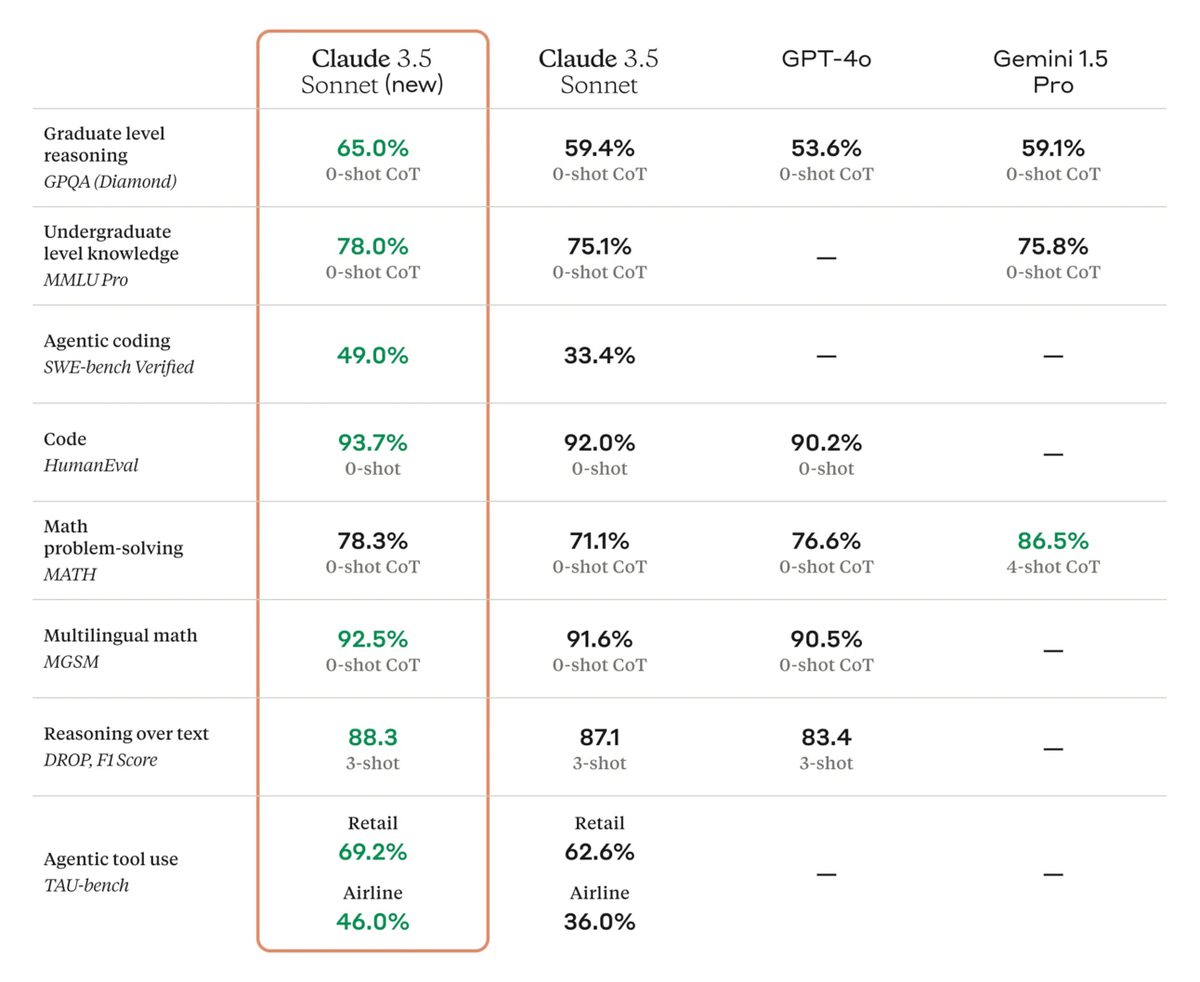
Anthropic recently announced their latest flagship model Claude 3.5 Sonnet and it is the best LLM available at the moment. Especially in coding tasks, it exceeds any other LLM by a good margin.
Accessibility & Pricing
Claude 3.5 Sonnet is available through multiple platforms:
- Anthropic API
- Amazon Bedrock
- Google Cloud's Vertex AI
- Claude.ai (web, iOS, and Android)
The pricing structure is designed to be competitive and scalable:
- $3 per million input tokens
- $15 per million output tokens
- Up to 90% savings with prompt caching
- 50% cost reduction through Message Batches API
Where Claude 3.5 Sonnet (new) excels
According to Claude 3.5 Sonnet demonstrates particular strength in:
- Data extraction and analysis
- Coding and Software Development
- Robotic process automation
- Knowledge base management
- Custom AI solution development
We can confirm, that Claude 3.5 Sonnet is a major step ahead in Coding and Data Extraction tasks.
Read the full announcement here.
Opinion: The problem of AI prototypes - and how to solve it
Also in the news
OpenAI releases realtime web-search for ChatGPT
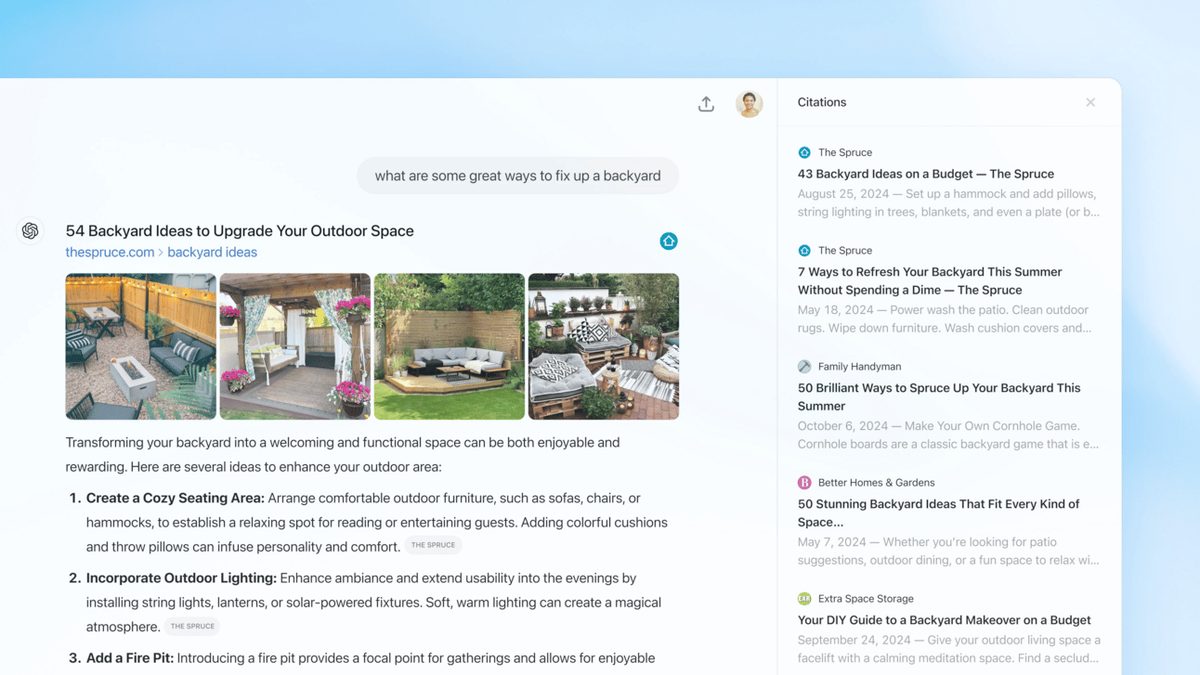
OpenAI is on the roll at the moment. After releasing the realtime voice API just some weeks ago, OpenAI delivers another long-awaited feature: Their realtime web-search, directly integrated into ChatGPT.
New ChatGPT search integration - with citations
Why’s that great?
- ChatGPT automatically searches web sources, without relying on external search engines. Making it much faster and more reliable
- You can get fast, timely answers with links to relevant web sources, which you would have previously needed to go to a search engine for
- No more knowledge-cutoff
Read the full announcement post here.
Google introduces Open-Source tool to watermark AI generated content
Google has released SynthID, a new suite of tools that brings transparency to AI-generated content. Using sophisticated watermarking technology, SynthID can now identify AI-created text, images, audio, and video while maintaining the original content quality.
Key Features:
• Invisible watermarking that's detectable by verification tools
• Works across multiple content types
• Resistant to common modifications
• Available through Vertex AI and other Google products
Why It Matters
As AI-generated content becomes more widespread, being able to identify its origin is important for maintaining trust and authenticity online.
However, the major make-or-break factor is, whether other AI providers will jump on board and integrate SynthID in their products.
We at Pondhouse Data OG are huge fans of watermarking, as we firmly believe that AI generated content - while very helpful - should be identifiable as such.
Read more on Google’s announcement post.
Tip of the week
Key Prompting Techniques to keep AI-Generated Summaries focused
While asking an AI to 'summarize this text' seems straightforward, many users quickly discover that LLM-generated summaries can wander off-topic, miss crucial points, or fabricate details. The challenge isn't getting a summary—it's getting a reliable one. What looks like a simple task often results in summaries that lack precision, omit key information, or include irrelevant details. However, with the right prompting techniques, you can significantly improve the focus and accuracy of AI-generated summaries.
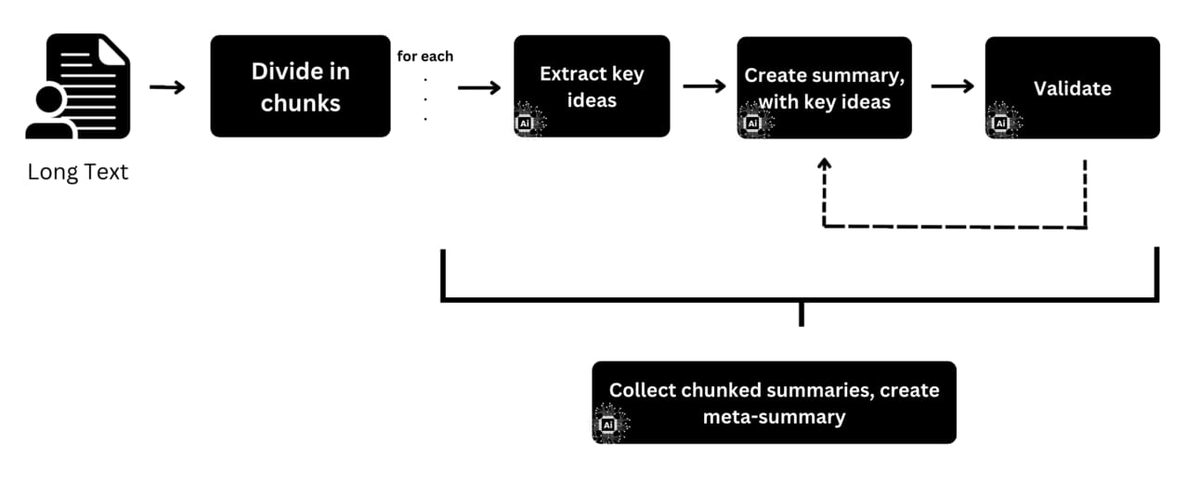
The most important idea is: The summarization itself happens in three steps:
- Ask the LLM to extract key ideas
- Ask the LLM to summarize the text, by making sure to include the key ideas
- Use a validation loop to verify, that the summary contains the key ideas
This allows to implement the following structured process which also works for longer texts.
Text Segmentation
- Divide long texts into 1500-word chunks
- Maintain logical breaks (sections, arguments, themes)
- Number chunks for traceability
- Create a simple tracking system
Individual Chunk Processing
For each chunk:
- Generate initial summary (150 words)
- Extract 3-5 key ideas as bullet points
- Create structured summary incorporating key ideas
- Tag important quotes or data points
Validation Loop
For each chunk summary:
- Verify key ideas are present
- Cross-reference with original text
- Check for information accuracy
- Flag any uncertainties or gaps
Final Synthesis
- Generate meta-summary of all chunks
- Validate against key ideas list
- Optional: Polish the final summary for readability
We hope you liked our newsletter and you stay tuned for the next edition. If you need help with your AI tasks and implementations - let us know. We are happy to help